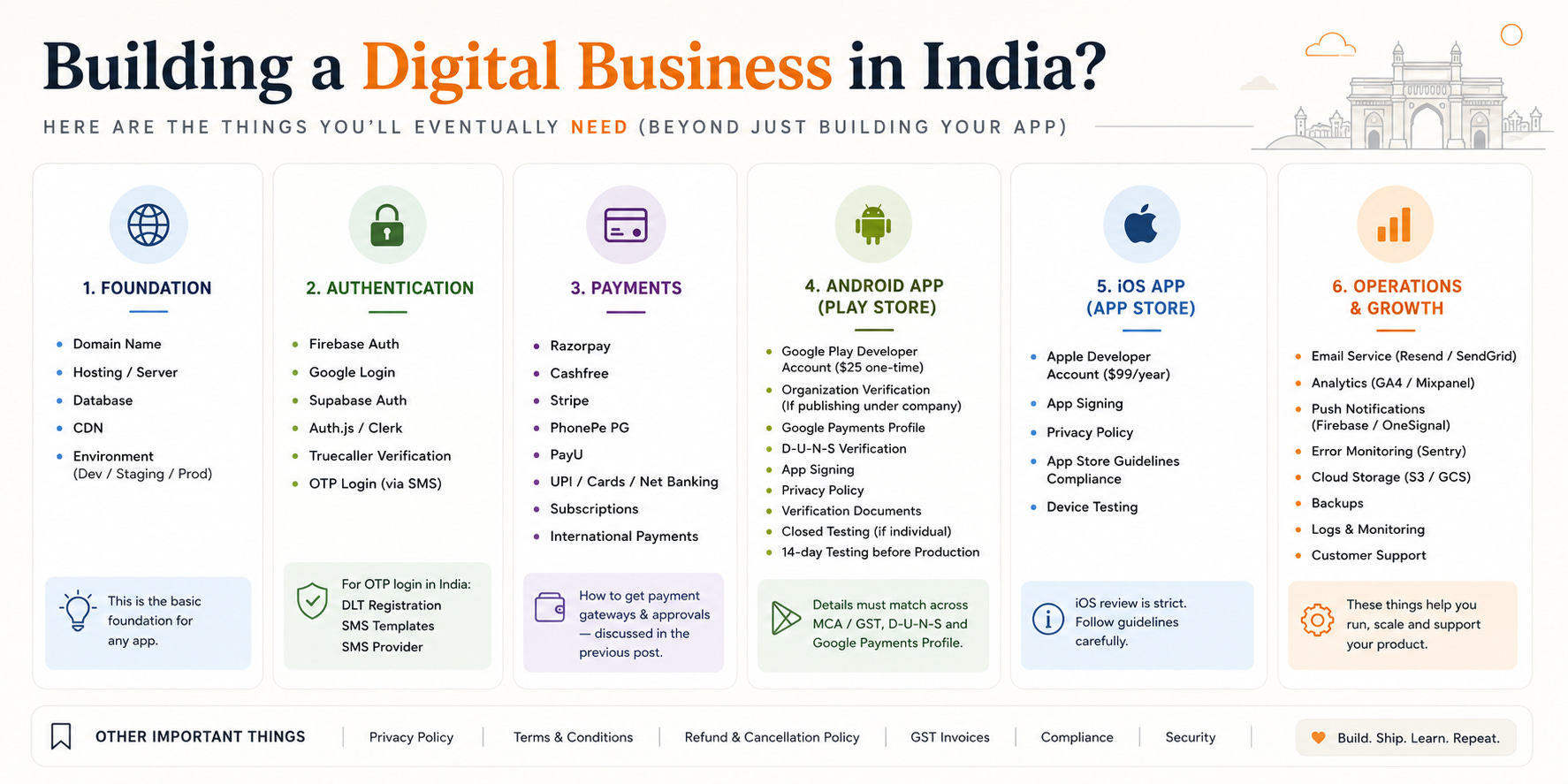
In the last post, we talked about setting up your company.
Now you’re ready to build.
But before you write a single line of code, there’s something worth understanding.
Every app regardless of what it does needs the same core pieces to actually work. Most first-time builders discover this the hard way, midway through building, when they realise there’s a whole layer of setup they didn’t account for.
This post is that layer.
Think of it as a checklist. Go through each item, understand what’s involved, and by the end you’ll know exactly what needs to be in place before your app goes live.
Step 1 — Choose Your Platform
The first decision is where your product will live.
There are four main options.
Web app is the simplest starting point. You deploy code, connect a database, point a domain at it, and you’re live. No approvals, no review cycles, no waiting. Domains can cost anywhere from under $1 to thousands it depends on what you pick. Hosting and databases have generous free tiers now, so your early running cost is often close to zero. For most first-time builders, this is where you should start.
Android app gives you access to the Play Store and the massive Android user base in India. Setting up a Google Play Developer account costs a one-time $25 — no recurring fee after that. If you’re publishing under a company, Google requires a D-U-N-S number that needs to match your MCA and GST records cleanly. Get it wrong and verification becomes a headache.
If you’re publishing as an individual, there’s a closed testing requirement — real testers, around 14 days — before production access opens up.
iOS app gives you access to the App Store and Apple’s user base, which tends to skew higher on spending. The Apple Developer Program costs $99/year — recurring, unlike Android’s one-time fee. App Store review is stricter and slower than the Play Store. Apple manually reviews every submission, so expect 1–3 days for initial review, sometimes longer if they come back with questions.
If you have a company, enroll as an organization rather than an individual — it unlocks more capabilities and looks more credible to users.
One thing worth noting: if you want to ship on both Android and iOS, tools like React Native or Flutter let you build once and deploy to both. For small teams, this is almost always the smarter move than maintaining two separate codebases.
Browser extension is the most underrated option. Fast to build, instant to distribute, no installation friction for users. The Chrome Web Store charges a one-time $5 fee to register as a developer. If your idea works inside a browser — a productivity tool, a writing helper, anything utility-based — seriously consider this before jumping to a full mobile app.
The platform choice shapes everything downstream. Pick the one that fits your idea, then move to the next step.
Step 2 — Set Up Authentication
Every app needs login. This is non-negotiable.
The good news is that this has become one of the easiest problems to solve.
Google Sign-In handles the majority of use cases and costs almost nothing to set up. Firebase Authentication and the Google API both work well. For most early products, this alone is enough — no SMS, no OTP, no complexity, and effectively free.
For Indian consumer apps, Truecaller verification is worth a serious look. Most users in India already have Truecaller installed. That means one-tap login instead of waiting for an OTP to arrive. It’s faster for the user and saves you SMS costs. If you’re building for Indian users, this is one of the highest-leverage decisions you can make early on.
The rule of thumb: start with Google Sign-In, add Truecaller if you’re targeting Indian consumers, and only move to OTP if your use case genuinely requires it.
Step 3 — OTP and SMS (Only If You Need It)
Some products need OTP-based login — anything involving financial flows, delivery tracking, or users who are less comfortable with Google login.
If that’s you, here’s how the pipeline works in India.
First, you need DLT registration. This is a TRAI mandate for any business sending commercial SMS. You register with a telecom provider — Jio, Airtel, and others offer this. DLT registration costs around ₹5,900 with taxes, one-time. Your SMS templates need to be approved through this system before you can send a single message.
Second, you connect your DLT account to an OTP provider — services like MSG91, Exotel, Gupshup, or Equance sit on top and handle the actual delivery. Cost is roughly ₹0.10 per message depending on the provider and volume.
One important thing: most DLT providers expect you to have a registered business. This is another reason the company setup from Part 1 matters. Without it, this step gets complicated.
Set this up early. SMS approvals in India take time, and you don’t want to be blocked on this the week before launch.
Step 4 — Payments
If your app makes money — and eventually it should — you need a payment gateway.
The options in India are solid now. Razorpay, Cashfree, PayU, and PhonePe Gateway all support UPI, cards, net banking, subscriptions, and international payments. Stripe works well if you’re targeting global users.
The integration itself is not the hard part. Most providers have good documentation and SDKs. Setup is free — they charge a small percentage per transaction instead, usually around 2% depending on the provider and payment method.
What takes time is the paperwork — business documents, bank verification, sometimes GST. Having your company setup clean from the start makes this significantly faster.
One thing to keep in mind: payment gateways will review your product before approving you. Have a working product or at least a clear landing page before you apply. A half-built app with no description is a common reason for rejection.
The Checklist, Summarised
Before your app goes live, you need:
Platform — web (free to start), Android ($25 one-time), iOS ($99/year), or extension ($5 one-time). Pick one and move.
Authentication — Google Sign-In to start (free). Truecaller if you’re building for Indian users.
OTP/SMS — only if your use case needs it. DLT registration (~₹5,900) first, then an OTP provider (~₹0.10/message).
Payments — pick a gateway (free to set up, ~2% per transaction). Keep your business documents ready.
That’s it.
Everything else — the features, the design, the marketing — comes after these are in place.
The builders who move fast are not the ones with the best ideas. They’re the ones who knew what needed to be done before they started, and did it without overthinking.
Now you know. Go build.